
Catch update conflicts before they break your site
Plugin and WordPress updates can change code that your theme and custom plugins rely on. Update Analyzer compares each available update with the code your site runs. If something could break, you see the affected file and what to do before you click Update.
Included in every Monitoring plan.
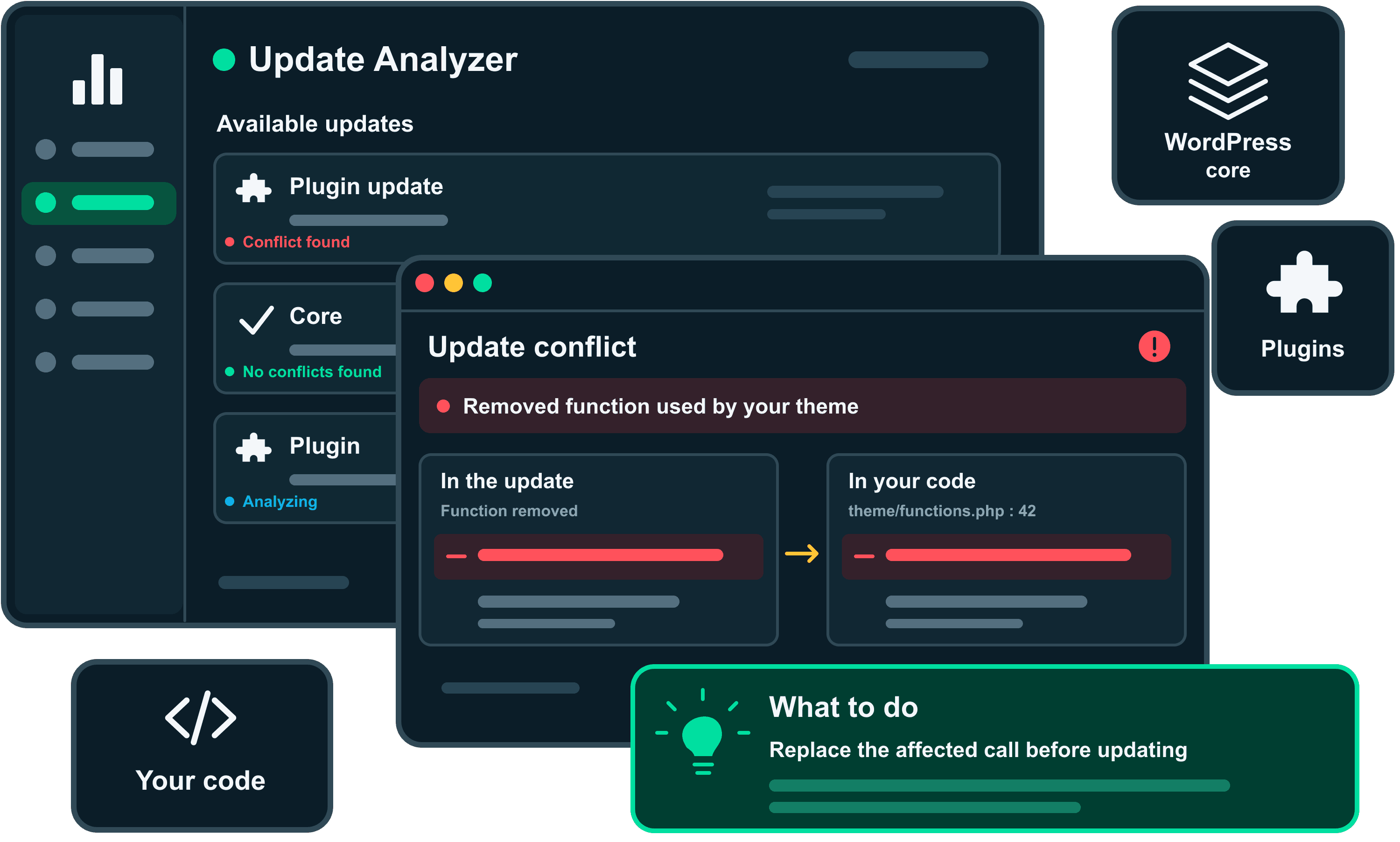
How Update Analyzer works
When an update breaks a site, the cause is often your theme or custom plugins relying on code the update changed or removed. WordPress installs the update without complaint, and the error shows up on your live pages. Update Analyzer looks for those connections before you update.
- 1
Your site reports its available updates
The EarlyGoose plugin passes on the updates WordPress already found, with your installed versions and automatic update settings.
- 2
EarlyGoose finds what changed
It downloads the official release from WordPress.org and compares its PHP code with the version installed on your site.
- 3
Your code is checked against the changes
Where your theme, custom plugins or edited plugin files use changed code, AI reviews those places. If nothing matches, no AI review is needed.
See which updates could break your site
Every available update is listed with its analysis status and result. “No matching PHP changes” means your theme and custom plugins don’t use any of the PHP the update changes. When an update does affect your code, its details explain the problem in plain language, with a suggested action and the exact lines in the update and in your code. The same results appear in the EarlyGoose plugin in your WordPress admin.
Updates
| Package | Installed | Available | Automatic updates | Analysis status | Results |
|---|---|---|---|---|---|
| WordPress | 7.1 | 7.2 | Disabled in WordPress | Analysis in progress | Not assessed |
| Package | Installed | Available | Automatic updates | Analysis status | Results |
|---|---|---|---|---|---|
| SEO Toolkit | 4.0.2 | 4.2.4 | Disabled in WordPress | Completed | 1 potential issue detected |
| Gallery Lightbox | 2.9.1 | 3.0.0 | Disabled in WordPress | Completed | No matching PHP changes |
| Redirect Manager | 1.8.0 | 1.8.2 | Enabled in WordPress | Skipped | Not assessed |
| Duplicate Post HelperInactive | 4.6 | 4.7 | Disabled in WordPress | Not running | Not assessed |
| Package | Installed | Available | Automatic updates | Analysis status | Results |
|---|---|---|---|---|---|
| Contact Form X | 2.1.0 | 2.2.0 | Disabled in WordPress | Analysis not available | Not assessed |
| Harborstone Booking | 1.4.2 | 1.5.0 | Unknown | Analysis not available | Not assessed |
1 potential issue detected
The Sequoia theme builds page titles with a function that 4.2.4 removes. Those pages would fail as soon as this update installs.
Ask your developer to update the theme code before you install this update.
Installed release: seo-toolkit/includes/meta.php:88–96
Custom code: wp-content/themes/sequoia/inc/seo.php:41–43
Check plugin requirements before a WordPress update
The details of a WordPress core update list the active plugins that might not be ready for it: plugins only tested with older WordPress versions, and plugins that need a newer PHP or WordPress version than your site will have. These warnings come from what each plugin declares, so you see them straight away, before the code analysis finishes. An older testing note is a reason to check, not proof of a problem, and the warning says so.
Updates
| Package | Installed | Available | Automatic updates | Analysis status | Results |
|---|---|---|---|---|---|
| WordPress | 7.1 | 7.2 | Disabled in WordPress | Analysis in progress | Not assessed |
| Package | Installed | Available | Automatic updates | Analysis status | Results |
|---|---|---|---|---|---|
| SEO Toolkit | 4.0.2 | 4.2.4 | Disabled in WordPress | Completed | 1 potential issue detected |
| Gallery Lightbox | 2.9.1 | 3.0.0 | Disabled in WordPress | Completed | No matching PHP changes |
| Redirect Manager | 1.8.0 | 1.8.2 | Enabled in WordPress | Skipped | Not assessed |
| Duplicate Post HelperInactive | 4.6 | 4.7 | Disabled in WordPress | Not running | Not assessed |
| Package | Installed | Available | Automatic updates | Analysis status | Results |
|---|---|---|---|---|---|
| Contact Form X | 2.1.0 | 2.2.0 | Disabled in WordPress | Analysis not available | Not assessed |
| Harborstone Booking | 1.4.2 | 1.5.0 | Unknown | Analysis not available | Not assessed |
The selected code is being reviewed.
Switch off automatic updates without leaving EarlyGoose
WordPress can install updates on its own before anyone sees a result, so EarlyGoose skips updates set to install automatically. From the Updates page, switch off automatic updates for all plugins, a single plugin or major WordPress releases. Minor WordPress releases, which carry security fixes, keep installing on their own. The plugin applies the change on your site, and EarlyGoose checks those updates from then on. If a code snippet, another plugin or your hosting provider controls the setting, EarlyGoose tells you where it has to be changed.
Updates
| Package | Installed | Available | Automatic updates | Analysis status | Results |
|---|---|---|---|---|---|
| WordPress | 7.1 | 7.2 | Disabled in WordPress | Analysis in progress | Not assessed |
| Package | Installed | Available | Automatic updates | Analysis status | Results |
|---|---|---|---|---|---|
| SEO Toolkit | 4.0.2 | 4.2.4 | Disabled in WordPress | Completed | 1 potential issue detected |
| Gallery Lightbox | 2.9.1 | 3.0.0 | Disabled in WordPress | Completed | No matching PHP changes |
| Redirect Manager | 1.8.0 | 1.8.2 | Enabled in WordPressEnabled in WordPressDisabled in WordPress | SkippedWaiting for WordPressWaiting for analysis | Not assessed |
| Duplicate Post HelperInactive | 4.6 | 4.7 | Disabled in WordPress | Not runningWaiting for WordPressNot running | Not assessed |
Affected plugins (6)
- Contact Form X
- Duplicate Post Helper
- Gallery Lightbox
- Harborstone Booking
- Redirect Manager
- SEO Toolkit
- You will be responsible for installing future updates for these plugins, including security fixes.
- These settings do not guarantee that a host-managed updater will stop or cancel an installation already underway.
Get an email when a risky update is set to install automatically
Automatic updates can be switched back on after EarlyGoose has found a problem, by a teammate, another plugin or your hosting provider. When that happens, EarlyGoose emails the site’s team right away. The email names the update and the issue and links to its details, so you can switch the update back to manual or have the code fixed first. Each person can turn these emails off for a site in their notification settings.
Review the SEO Toolkit update on harborstone.co
Page titles stop rendering in SEO Toolkit 4.2.4
2 critical findings still open
Your daily EarlyGoose summary
Staging copy of harborstone.co
It is ready whenever you want to try the next round of updates.
Booking form questions
Two customers asked whether they can change a booking online.
Photos for the About page
The new team photos are in the shared folder.
October newsletter draft
Draft attached. Could you check the opening paragraph?
No message selected
Review the SEO Toolkit update on harborstone.co
An automatic update on harborstone.co needs your attention
The Sequoia theme builds page titles with a function that 4.2.4 removes. Those pages would fail as soon as this update installs.
WordPress reports automatic updates enabled for SEO Toolkit on harborstone.co. Review the results and consider managing this update manually before it installs.
View updates in your dashboardYou are getting this because you get emails for a site on EarlyGoose. You can change what EarlyGoose emails you in your account settings.
What Update Analyzer checks
Every result says what it covers. If EarlyGoose couldn’t check part of the code, the result says so and lists the limits of the review. An analysis that hasn’t finished is never shown as a clean result.
Updates it checks
- WordPress core updates
- Plugin updates from WordPress.org
Code it compares them with
- Active custom and premium plugins
- Must-use plugins
- Your active theme and child theme
- Your edits to WordPress.org plugins
Not included
- Theme updates
- Updates to premium and custom plugins
- Updates set to install automatically
- Updates to inactive plugins
- Installing, blocking or rolling back updates
Check your next update before you install it
Connect a site to Monitoring. Update Analyzer lists its available updates and checks the ones you install yourself.
Got questions about Update Analyzer?
Learn what Update Analyzer checks and where its limits are. Still have questions? Contact us.
Contact usIt starts on its own when WordPress reports an update for your site, and runs again when your code or the update changes. You don’t need to start it. How long it takes depends on the size of the update and how much of your code uses it.